htaccess Password Protect URL
To add password protection to your website, you need to create a file to store usernames/passwords and add some code into a .htaccess file.
Creating Hash Password
You can generate a hash password online at: https://www.lcn.com/support/articles/how-to-password-protect-a-folder-on-your-website-with-htaccess/
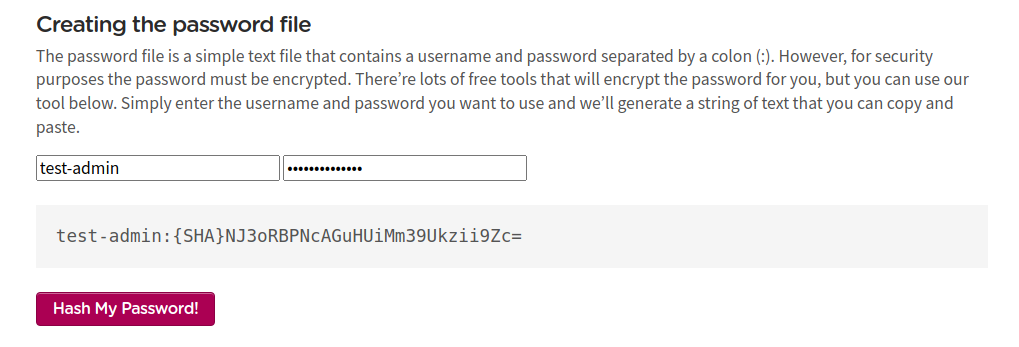
Fig. 2 Creating Hash password
Steps to Create Password Protection
Create a file using a text editor such as Notepad or TextEdit.
Save the file as:
.htpasswdCopy and paste the username/password string generated using our tool into the document.
Upload the
.htpasswdfile to your website using FTP.Add the following code to the
.htpasswdfile:test-admin:{SHA}NJ3oRBPNcAGuHUiMm39Ukzii9Zc=Example login credentials:
Username: test-adminPassword: test-admin@123Add the following code to the
.htaccessfile in your website root directory (e.g.,/var/www/html/<magento_root>/.htaccess):AuthType Basic AuthName "restricted area" AuthUserFile /var/www/html/magento/.htpasswd require valid-user
Understanding the .htaccess Configuration
Let’s examine each line of the .htaccess configuration in detail:
Line 1: AuthType Basic
Defines the type of authentication the web server will use.
Basicis the standard HTTP authentication method and is adequate for password protection.
Line 2: AuthName “restricted area”
Sets the title of the username/password dialog box that will appear when someone tries to access your protected page.
Line 3: AuthUserFile /var/www/html/magento/.htpasswd
Specifies the absolute path to the username/password file on the server.
Important
You must update this path to match the actual location of your
.htpasswdfile.Path examples:
Absolute path:
/var/www/html/magento/.htpasswdSame directory:
./.htpasswdParent directory:
../.htpasswd
Line 4: require valid-user
Specifies who can access the protected folder. Using
valid-usermeans any user listed in the.htpasswdfile can access the folder.
Note
After implementing these changes, users will be prompted to enter a username and password when accessing the protected directory or URL.